MacFusion: mounting FTP/SFTP with integration into the Finder (OS X) 2007-07-31
This is fun: MacFusion mounts FTP/SFTP connections so they appear in the Finder and are accessible by any application. This means you can move files from and to the server just like with any other drive.
A great thing: This way you can edit files directly on your server with your favourite text editor (just in case VI is NOT your favourite editor; otherwise you’ve been doing this for 30 years).
MacFusion is just the GUI for FUSE ported to the Mac by Google. In order to run MacFusion you need to install MacFUSE (and SSHfs for SSH-support) first.
Did I mention it is free?
Oh and one thing to know: The OS X finder will automatically create hidden .DS_STORE files in each directory (for saving the view settings), which is pretty annoying, but you should know about.
Remote desktop on Windows 2003 terminal server: Logs on and off again 2007-07-16
I’ve had this weird behaviour the other day: I tried to log on to my Windows 2003 terminal server via remote desktop and it would log on, show the desktop for a split second and log me off again. Over and over. Uh? My username was in the “Remote Desktop Users” group, the “Terminal Services” was running, the log file didn’ t give an error (just normal log on, log off), so everything seemed ok.
Now, thanks to the great invention of this thing called internet, I found out people have heard about this strangeness happening sometimes, when running NVIDIA graphic cards. After stopping the “NVIDIA Display Driver Service” (which is just there to annoy you on a server anyway; stopping it doesn’t remove the drivers), everything works like a charm again.
Now I can go and mess up my machine with service pack 2, so it dosn’t get boring. ;)
FileVault benchmark: Encrypting personal folders on OS X 2007-07-14
With my setup I measured the performance of FileVault vs no encryption.
Conclusion: FileFault slows down the system by about 4%
Today I activated FileVault for protecting my private data in case (hope it never ever happens!) my MacBook gets stolen (or lost by stupidity).
FileVault works quite different in contrast to the Windows-like encryption, which works on the filesystem-level of NTFS. With FileVault on OS X you have no options on what directories or files to encrypt or not. It’s all (of your user folders) or nothing. OS X will take your whole user directory and put it in an encrypted sparse file which will be mounted as your user directory. This means, everything in your users’s folder is in there, including your media (iTunes library, GB-large video files), cache-files for applications. This also means, it will take some time — and as much free diskspace as you have data to encrypt. Same deal the other way around: You will need lots of free space if you once decide to turn FileVault off. If you don’t have enough, it won’t be possible, so think twice.
Now, since everything is encrypted and put into one single file, I was somewhat concerned about performance. Especially on a notebook, you don’t want to give performance = battery time away. So, I’ve done a very simple benchmark.
The benchmark
The setup
- 2006 MacBook Core 2 Duo @ 2 GHz, 1 GB RAM, 160 GB WD Scorpio harddisk, OS X 10.4.10 (Tiger)
- Personal files (and thus the FileVault file) about 40 GB
What I measured
I took a rared iso image (about 710 Mb, which extracts to about 2,1 GB), copied it to the (unencrypted) shared folder and a folder within the FileVault. This means the archives each were read and then unpacked to an unencrypted, respectively encrypted directory.
I unpacked each a couple of times with rar from the shell, afterwards deleted the unpacked folder, removed from trash and did it again.
Why did I chose this method? The file to be read and the files to be written are large and many enough to show some impact on the performance that is only based on the read/write performance, plus it puts some load on the cpu, which I think simulates real life application usage very well. After all, you don’t only copy files from here to there but it’s your application that writes and reads files while you use it, right?
How I measured
I turned off ClamAV and Spotlight, closed all windowed apps but one finder window and the process manager to minimize external factors. From the shell, I told rar to extract the archive, then switched to the already open process monitor, looked for the running rar process and opened the “information” window about that given process. This way it would stay open after the process finished and give the exact amount of time it took. Then minimized the activity monitor and focused the desktop to leave the unpacking alone.
This is no rocket science, but the numbers don’t go off by a lot, so I think they are somewhat meaningful.
The results
Here are the times it took for extracting each rar file.
Non-encrypted directory:
- 2:26.74 (146.74 secs)
- 2:26.19 (146.19 secs)
- 2:26.67 (146.67 secs)
The biggest difference is 0.55 seconds, which is about 0,37 % and thus neglectable small, I think.
FileVault directory:
- 2:32.08 (152.08 secs)
- 2:33.48 (153.48 secs)
- 2:32.46 (152.46 secs)
The biggest difference here is 1.4 seconds which is about 0,92%, which I believe is ok to use.
The difference between the two medians is 5.79 seconds, which means using FileVault encryption is about 3.9% slower than no encryption. On a brand new dual core. I expect this to be even more crucial on older machines.
Drupal: Workflow and Revision Moderation modules don't play together 2007-07-02
Besides the Revisions Moderation module of Drupal needing a fix before it works, it won’t work with the Workflow module as most people would like or expect:
The Workflow module will only work for the most recent/approved revision. So if you, for example, have a “live” and a “draft” status in your workflow, where the move from “live” to “draft” will unpublish the node, it will become inaccessible for everyone else; not only the revision, as you might expect or hope.
Someone might need to work on this.
Drag-and-drop attachments in Thunderbird 2006-12-21
Oh, it always annoyed me, that you can’t simply drag-and-drop attachments into the message part of the window in Mozilla Thunderbird as you can in Outlook. Especially if it’s a couple more files, it is pretty tiring to always click “add” and select each one.
Now, completely by accident, I found out, that you actually can add files by drag-and-drop, even multiple ones!
In Thunderbird, you have to drop it either onto the attachment button, the subject field, or the receiver field. That is months after my first use and I don’t consider myself a computer noob. Now, let’s talk about usability again. ;)
Adobe Reader, formerly know as Acrobat Reader annoys me 2006-10-20
... because after every update, it will put an icon on the desktop, even after it has been deleted.
Go away. Stay away.
Free (and useful) Download Manager 2006-09-23
Free Download Manager is a free (oh, really?) and powerful download manager for Windows.
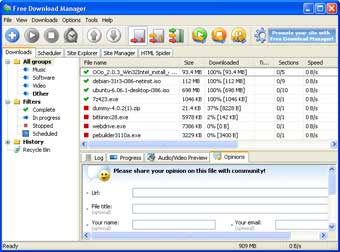
It offers all you can ask a download manager to do: It can split downloads into chunks for simultanous download, resume and time downloads for later, limit bandwith, and, of course get files from ftp, http, https sites. It just does what it should and is easy to use.
Seriously, I’ve been looking for this for years. 5 stars, period.
Don't use bBlog, please 2006-07-13
It really gets me into a strange mood to say this, but:
People, please don’t use bBlog anymore.
The reason is simple: The last release dates from 18th of July 2005, and if you do the math, that is exactly a year. Nothing has happend since then. No updates, no bugfixes, not a lot of support.
And it was another year before that, that nothing has happened to the bBlog code, except a couple of critical bug fixes. So you can roughly say, that piece of software wasn’t really touched for about two years. And as you count web years like dog years, that’s really a long time.
I’m not saying that it’s bad, just because it’s not brandnew. The main problem you will be facing is comment and trackback spam if you decide to run bBlog these days. Sure there are workarounds, but if you leave an install as is, you’re about to face thousands of comments to each article you post.
Also, you will not find any more new themes, plug-ins, or new features.
I was involved in the last two releases, and it was fun. But to be honest, bBlog has been out-dated by a lot of blog software, including Wordpress and Drupal to name some of the most popular. They are easier to use and administer, have much more to offer and are constantly updated.
Go, find something better. And remember bBlog.
Very funny, Apple 2006-06-06
Figure 1: the free version (left) and Quicktime Pro (right)
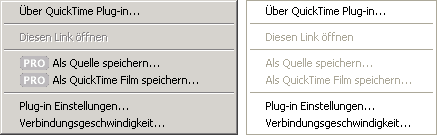
Can you see the difference? It’s the German version, but that doesn’t matter (I hope), guess you get the point: There is no difference. At least not here. It implies that you can downlod every movie if you buy the Pro version of Quicktime. But after you buy it, the “save as …” link becomes greyish and incative.
Not like I was buying it for downloading movies from the net. There’s other and cheaper ways (disk cache in Firefox). But if I had bought it for that reason, I would be a kinda pissed to find out that you can’t.
Addition from June 14th: It seems that you have to wait untill the movie has completely finished loading in your browser, before the “save as …” becomes clickable. This is not very good usability, is it.
Nero 7 sucks 2006-05-23
I am very sorry to say this but I am also very angry right now. I’m in a hurry and need to burn 3 DVDs, but I also have to reboot (another pc, not this one) after every disc, so I have a minute to write this:
Nero 7 sucks
I just paid around 40€ for upgrading from Nero 6 to Nero 7 and I happen to notice that the »all new« Nero 7 is just a buggy collection of software. And I don’t mean small glitches, like English text popping up, even though I installed the German version.
I am talking about Nero BackItUp telling me that the rest of my 10 gigs of data won’t fit onto the same DVD (smartass). And simply quitting the burning process instead of asking for another disc:
bq. Unfortunately your multisession disc is now full. The remaining free space of 1657 MB on this disc is insufficient to write your data of 1804 MB. Therefore this multisession backup cannot be continued.
What the hell?
I am talking about Nero Burning Rom — the burning software that everything started with, the software you should expect to be working perfectly — becoming completely unresponsive after burning a DVD. Not even killing it through the taskmanager and restarting works. I have to fracking reboot my pc after every single disc I burn!
I used to be quite satisfied with Nero 6. The Burning Rom worked perfectly. Recode was pretty cool and I even used Vision Express to author DVDs.
Well, that’s 40€ down the toilet. And I can’t even sell it on eBay because it was the download version.